|
|
| Read All Kinds of Magazines For Free
|
Thursday, July 24, 2008 @ 7:39 PM
¦
¦  Stumble It! ¦ |

Earlier I had mentioned a trick to read popular magazines like PC Magazine, MIT Technology Review, Popular Mechanics, etc without paying any subscription charges. While the above trick lets you read only a few number of magazines, with Mygazines, you can read unlimited number of magazines ranging from computer magazines like MacWorld, PC Magazine to news and business magazines like Business Week,Forbes, etc., Mygazines is a community driven website that allows its users to upload and share magazines online. See some screen shots below.   Registration is optional. But upon registration,you can upload and save your favorite magazines for reading later. It opens in a flash flip-book style and you can use either mouse or keyboard keys to turn the pages. Key Features:1. You can browse magazines in categories like Entertainment & TV,Computers & Internet,Sports,News, Business & Money,Womens's Interests etc., or user generated tags like music, language,english,heart, history,Confessions, cool, culture, etc., or Top ranked magazines, most rated magazines etc.,2. The best part is that you can even search inside the magazines and also you can search for articles.  3. You can share the magazines via email,social networking sites like facebook, myspace, digg etc., Checkout Mygazines now | FAQLabels: free magazines, magazines |
| |
| How to Read Popular Magazines Online for Free
|
| Monday, June 09, 2008 @ 7:25 PM
¦
¦ Stumble It! ¦
|
 If you are using Safari or Firefox browsers, then it's very easy to read popular Magazines like PC Magazine, MIT Technology Review, Popular Mechanics, MacWorld, Lonely Planet, Reader’s Digest, etc without paying any subscription charges. You can also read adult magazines like Playboy and Penthouse.
Here is the trick using Safari Browser:If you do not have Safari Browser, download and install from apple.comStep 1.Open Safari and go to Edit -> Preferences -> Advanced and check the option that says "Show Develop menu in menu bar." (See the screen shot below).
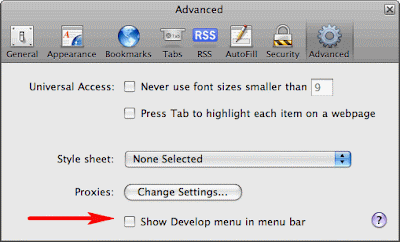 Step 2: Open the "Develop" option in the browser menu bar and choose Mobile Safari 1.1.3 - iPhone as the User Agent.(See the screen shot below).
 Step 3: Open zinio.com/iphone inside Safari browser and start reading your favorite magazines for free. Use the navigation arrows at the top to turn pages.Here is the trick using Firefox:
If you do not have Firefox Browser, download and install from mozilla.com
Step 1: Type “about:config” in the browser menu bar and hit enter key.
 Step 2: Type “useragent” in the filter(See the screen shot below) and hit enter key.
 Step 3: Double click “general.useragent.extra.firefox”and change the value from "Firefox/2.0.0.14" to “Mobile Safari 1.1.3"(See the screen shot below). Now you are ready to read the magazines.
  Step 4: Open zinio.com/iphone inside Firefox browser and start reading your favorite magazines for free. After reading, change the useragent back to “Firefox/2.0.0.14 following the above steps, otherwise some Firefox extensions would not work. via Digital Inspiraton | Thanks Caul & SureshLabels: feature, hacks, iphone, magazines, safari, zinio |
| | |
|