|
|
| Yahoo! Launches Public Open Hack Day 2008
|
Friday, September 05, 2008 @ 10:43 PM
¦
¦  Stumble It! ¦ Stumble It! ¦
|

If you are an hacking expert residing in US and looking for an opportunity to show your hacking skills, then your wait is over.
Yahoo is hosting public open Hack Day 2008 at Yahoo! HQ in Sunnyvale, CA, USA from 12-13 September 2008. But space is limited, so request an invite now to reserve your spot.They are inviting SearchMonkey and BOSS developers and partners - simply mention “Yahoo! Search” in the submission form to have first 50 tickets reserved for you.
Request an invite |via quickonlinetipsLabels: event, hacks, yahoo |
| |
| How to Read Popular Magazines Online for Free
|
| Monday, June 09, 2008 @ 7:25 PM
¦
¦ Stumble It! ¦
|
 If you are using Safari or Firefox browsers, then it's very easy to read popular Magazines like PC Magazine, MIT Technology Review, Popular Mechanics, MacWorld, Lonely Planet, Reader’s Digest, etc without paying any subscription charges. You can also read adult magazines like Playboy and Penthouse. If you are using Safari or Firefox browsers, then it's very easy to read popular Magazines like PC Magazine, MIT Technology Review, Popular Mechanics, MacWorld, Lonely Planet, Reader’s Digest, etc without paying any subscription charges. You can also read adult magazines like Playboy and Penthouse.
Here is the trick using Safari Browser:If you do not have Safari Browser, download and install from apple.comStep 1.Open Safari and go to Edit -> Preferences -> Advanced and check the option that says "Show Develop menu in menu bar." (See the screen shot below).
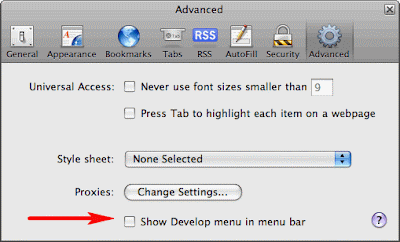 Step 2: Open the "Develop" option in the browser menu bar and choose Mobile Safari 1.1.3 - iPhone as the User Agent.(See the screen shot below). Step 2: Open the "Develop" option in the browser menu bar and choose Mobile Safari 1.1.3 - iPhone as the User Agent.(See the screen shot below).
 Step 3: Open zinio.com/iphone inside Safari browser and start reading your favorite magazines for free. Use the navigation arrows at the top to turn pages.Here is the trick using Firefox: Step 3: Open zinio.com/iphone inside Safari browser and start reading your favorite magazines for free. Use the navigation arrows at the top to turn pages.Here is the trick using Firefox:
If you do not have Firefox Browser, download and install from mozilla.com
Step 1: Type “about:config” in the browser menu bar and hit enter key.
 Step 2: Type “useragent” in the filter(See the screen shot below) and hit enter key. Step 2: Type “useragent” in the filter(See the screen shot below) and hit enter key.
 Step 3: Double click “general.useragent.extra.firefox”and change the value from "Firefox/2.0.0.14" to “Mobile Safari 1.1.3"(See the screen shot below). Now you are ready to read the magazines. Step 3: Double click “general.useragent.extra.firefox”and change the value from "Firefox/2.0.0.14" to “Mobile Safari 1.1.3"(See the screen shot below). Now you are ready to read the magazines.
  Step 4: Open zinio.com/iphone inside Firefox browser and start reading your favorite magazines for free. After reading, change the useragent back to “Firefox/2.0.0.14 following the above steps, otherwise some Firefox extensions would not work. Step 4: Open zinio.com/iphone inside Firefox browser and start reading your favorite magazines for free. After reading, change the useragent back to “Firefox/2.0.0.14 following the above steps, otherwise some Firefox extensions would not work.via Digital Inspiraton | Thanks Caul & SureshLabels: feature, hacks, iphone, magazines, safari, zinio |
| |
| Read a webpage without web connection
|
| Tuesday, October 30, 2007 @ 1:11 PM
¦
¦ Stumble It! ¦
|
I just spot a very interesting tips @ DI to read a webpage/blog over email when we encounter a situation where there is no internet but only having an option to send or receive emails.
You also might have come across a situation ( may be at your workplace) where you don't have access to internet but you can send or receive emails? With email and no Internet, how do you read websites and blogs or check the current stock prices, or find what’s the top story on your favourite news-site?.Just send a mail to www@web2mail.com with the URL of the web page in the Subject field (e.g. www.cnn.com) and you’ll soon find a copy of that web page in your Inbox.www4mail@wm.ictp.trieste.it- is also a similar service but here the site address should go in the body of the email message.These web-to-email services will come extremely handy for receiving on-demand Stock quotes (for the current Google stock price, type finance.yahoo.com/q?s=GOOG), weather updates, currency exchange rates (for USD to INR, type finance.yahoo.com/q?s=USDINR=X) and more.You can find more interesting email addresses @ DI that will be useful when you don't have accesss to internet. Labels: hacks, tricks |
| | |
|


