 If you are using Safari or Firefox browsers, then it's very easy to read popular Magazines like PC Magazine, MIT Technology Review, Popular Mechanics, MacWorld, Lonely Planet, Reader’s Digest, etc without paying any subscription charges. You can also read adult magazines like Playboy and Penthouse. If you are using Safari or Firefox browsers, then it's very easy to read popular Magazines like PC Magazine, MIT Technology Review, Popular Mechanics, MacWorld, Lonely Planet, Reader’s Digest, etc without paying any subscription charges. You can also read adult magazines like Playboy and Penthouse.
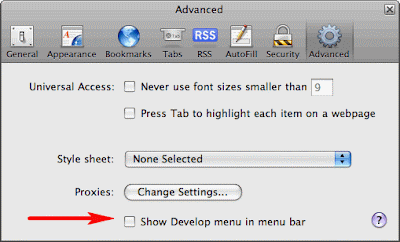
Here is the trick using Safari Browser:If you do not have Safari Browser, download and install from apple.comStep 1.Open Safari and go to Edit -> Preferences -> Advanced and check the option that says "Show Develop menu in menu bar." (See the screen shot below).
 Step 2: Open the "Develop" option in the browser menu bar and choose Mobile Safari 1.1.3 - iPhone as the User Agent.(See the screen shot below). Step 2: Open the "Develop" option in the browser menu bar and choose Mobile Safari 1.1.3 - iPhone as the User Agent.(See the screen shot below).
 Step 3: Open zinio.com/iphone inside Safari browser and start reading your favorite magazines for free. Use the navigation arrows at the top to turn pages.Here is the trick using Firefox: Step 3: Open zinio.com/iphone inside Safari browser and start reading your favorite magazines for free. Use the navigation arrows at the top to turn pages.Here is the trick using Firefox:
If you do not have Firefox Browser, download and install from mozilla.com
Step 1: Type “about:config” in the browser menu bar and hit enter key.
 Step 2: Type “useragent” in the filter(See the screen shot below) and hit enter key. Step 2: Type “useragent” in the filter(See the screen shot below) and hit enter key.
 Step 3: Double click “general.useragent.extra.firefox”and change the value from "Firefox/2.0.0.14" to “Mobile Safari 1.1.3"(See the screen shot below). Now you are ready to read the magazines. Step 3: Double click “general.useragent.extra.firefox”and change the value from "Firefox/2.0.0.14" to “Mobile Safari 1.1.3"(See the screen shot below). Now you are ready to read the magazines.
  Step 4: Open zinio.com/iphone inside Firefox browser and start reading your favorite magazines for free. After reading, change the useragent back to “Firefox/2.0.0.14 following the above steps, otherwise some Firefox extensions would not work. Step 4: Open zinio.com/iphone inside Firefox browser and start reading your favorite magazines for free. After reading, change the useragent back to “Firefox/2.0.0.14 following the above steps, otherwise some Firefox extensions would not work.via Digital Inspiraton | Thanks Caul & SureshLabels: feature, hacks, iphone, magazines, safari, zinio | 
 Stumble It!


